Authentic Knitting Board · Sock knitting looms
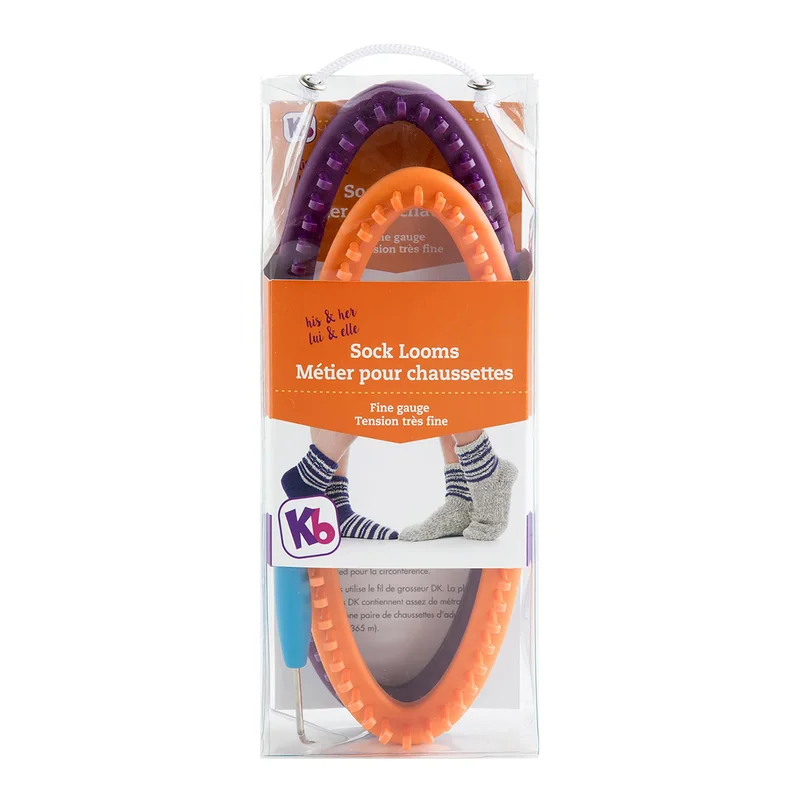
His & Her Fixed Sock Loom Set, 56 and 64 Pegs
Check your pattern or setup
- Working count by ring
- 56 on orange and 64 on purple
- Frame shape
- Two fixed ovals
- Material
- Plastic
When to choose it
For the Pebble Ridge Socks, the pattern gives a 56-peg and a 64-peg version. This set provides both fixed oval sizes, so you can start from the instructions for the chosen ring without setting a slider.
Knitting Board revised the peg spacing on this set while retaining the two counts. Check which edition you are working with and make the pattern swatch before comparing the finished fit. For a pattern that needs a count between the two rings, compare an adjustable sock loom with the required spacing.
Specifications
- Brand
- Authentic Knitting Board
- Construction
- Fixed oval set
- Work task
- Fine-gauge sock tubes
- Model
- His & Her Sock Looms
- Working count by ring
- 56 on orange and 64 on purple
- Frame shape
- Two fixed ovals
- Material
- Plastic
- Supplied tools
- Knit hook and instructions
- Amazon.com reference
- B074BDGDSG
Fit and buying advice
The set has two peg counts. Check edition and swatch if you need a specific finished circumference.
Related choice Original Fine-Gauge Wooden Sock Loom ↗
Compare options in this department ↗
Documentation
Questions about this product
Which ring should I use for a pattern with two cast-on counts?
Match the count in the version of the pattern you are knitting. The orange ring has 56 pegs and the purple ring has 64.
Can I set the purple ring to a 60-peg tube?
Each oval has a fixed peg count. Compare an adjustable frame if the pattern needs a continuous 60-peg path.
Why swatch if both editions have the same peg count?
The maker changed the space between the pegs. A swatch tells you how wide your stitches are on the particular frame and yarn you are using.